


Simple Planner
Vintage Hotel Aesthetic Digital Planner - Hand-Drawn iPad Journal
Vintage Hotel Aesthetic Digital Planner - Hand-Drawn iPad Journal
Couldn't load pickup availability
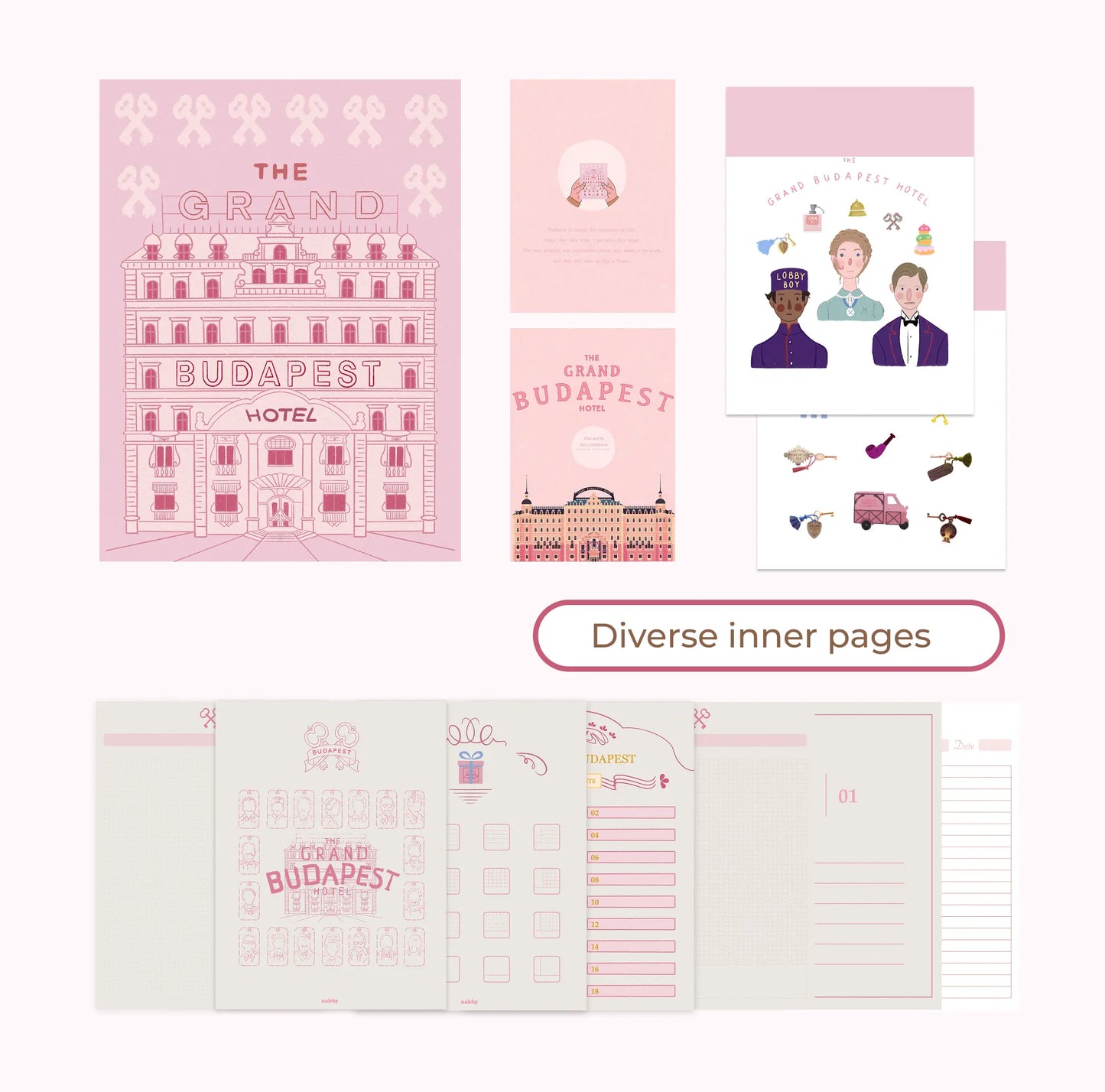
This vintage hotel aesthetic digital planner, with whimsical retro grand-hotel charm, fills your iPad journal with hand-drawn European architecture and cozy pastel scenes. It is made for students, creatives and journaling enthusiasts who want planning pages that feel like a storybook — and it makes a lovely gift for stationery lovers.
What's inside: 18 inner page templates covering a daily planner, weekly view, mood tracker, habit tracker, Cornell notes and more; 2 sticker sheets of hand-drawn, high-resolution PNGs formatted for easy copy-paste; and 3 artistic planner covers in pastel, hotel-themed designs. A fully hyperlinked navigation system ties it all together, so you can move between sections in a tap and duplicate any page as often as you like.
Compatibility: Works in GoodNotes, Notability, Noteshelf, Samsung Notes and any PDF annotation app; the stickers work anywhere PNGs can be imported.
Delivery: Delivered as a ZIP file containing PDFs and PNGs. Your instant download link appears on the checkout confirmation page and in your order email, with lifetime access. No physical item ships.
Please note: as an instant digital download, this planner is non-refundable once the files have been accessed. This is an independent, film-aesthetic-inspired design, not an official licensed product.
Share

Frequently asked questions
How do I get my files after purchase?
After you complete your checkout, you’ll see a download link on the order confirmation page.
You’ll also receive a confirmation email with the same download link.Click the link to instantly download your files to your device. It will be a zip file(since it contains multiple files),please unzip it~
Didn’t get the email?
Check spam/junk folders. Still missing? Contact us — we’ll resend or provide a Google Drive link.
Why is it a ZIP file? How do I unzip it?
It needs to be a zip file to include multiple PDFs, PNGs, or fonts).
Here’s how to open it 👇
- Mac: Double-click to unzip automatically.
- Windows: Right-click → “Extract All” or open with WinRAR / 7-Zip.
- iPad / iPhone: 1. Open the Files app, then find the ZIP file or archive you want to uncompress.2. Tap the ZIP file or archive. A folder will be created containing the files(and u can see the files inside now~)
- Android: Use Files by Google or any unzip app (like ZArchiver).
How to import the planner into my device?
Take Goodnotes as example,There are several ways to import:
- 、Open GoodNotes → tap “+” → Import → choose your downloaded file (from Files / iCloud / Dropbox).
- Or open your file in Files / Mail / Safari → tap “Share” → Open in GoodNotes / Copy to GoodNotes.
- You can also upload to your Drive or Dropbox, then open from there inside GoodNotes.
You can find a more detailed tutorial in our blog posts↓
More questions?
Our Blog has more how-to guides (and we’re still adding new ones!) — go take a look 💕
Blog posts
View all-
Stardew Valley Digital Planner Setup for GoodNotes
Set up a Stardew Valley digital planner in GoodNotes: import steps, fixing hyperlinked tabs, adding farm stickers, and seasonal planning ideas.
Stardew Valley Digital Planner Setup for GoodNotes
Set up a Stardew Valley digital planner in GoodNotes: import steps, fixing hyperlinked tabs, adding farm stickers, and seasonal planning ideas.
-
How to Choose a 2027 Digital Planner (Buying Gu...
How to choose a 2027 digital planner: dated vs undated, what to check before buying, planner styles compared, and why October beats January.
How to Choose a 2027 Digital Planner (Buying Gu...
How to choose a 2027 digital planner: dated vs undated, what to check before buying, planner styles compared, and why October beats January.
-
How to Use a Digital Planner: Beginner's Guide ...
Learn how to use a digital planner on iPad or tablet, from importing the PDF to daily planning with hyperlinks, stickers, and app tips.
How to Use a Digital Planner: Beginner's Guide ...
Learn how to use a digital planner on iPad or tablet, from importing the PDF to daily planning with hyperlinks, stickers, and app tips.